
Time records for the R&D tax credit: reconstruct first, then record in-house
NOVARIS reconstructs your R&D hours of past years in its own software, with a local AI and in line with the GDPR. From a cut-off date your employees record their hours there themselves, GoBD-compliant with a change log and verifiable exports.
- Hand over documents or import them directly
- From the cut-off date recorded by your employees, also on the phone
- Exact audit trail, every export verifiable
 Written by Max Nodes, Founder and Managing Director · 28 of 28 decided BSFZ applications certified (as of 11/2026) · Last updated: · Law as of:
Reconstruct first, then record in-house
Figures and details
Sample week, no real project data.
The software on video
How it works
How does the route from reconstruction to your own recording work?
In five steps: you hand over your documents or import them directly, a local AI allocates the hours to your project, every change is documented, a cut-off date defines the switch, and from then on your employees record their R&D hours themselves in the software.
Hand over or import documents
You hand over your existing time records, salary data and absences, or import them directly into the software.
You
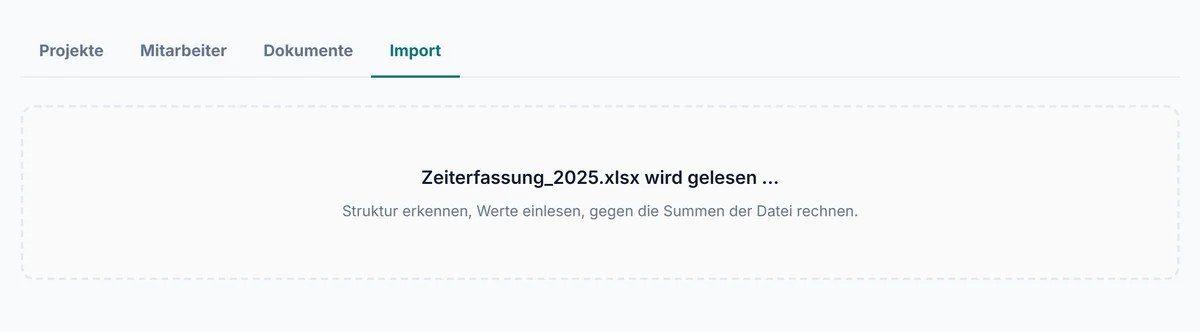
A local AI allocates the hours
A locally operated AI processes the data in line with the GDPR and allocates the hours to the project on the basis of your time records.
NOVARIS
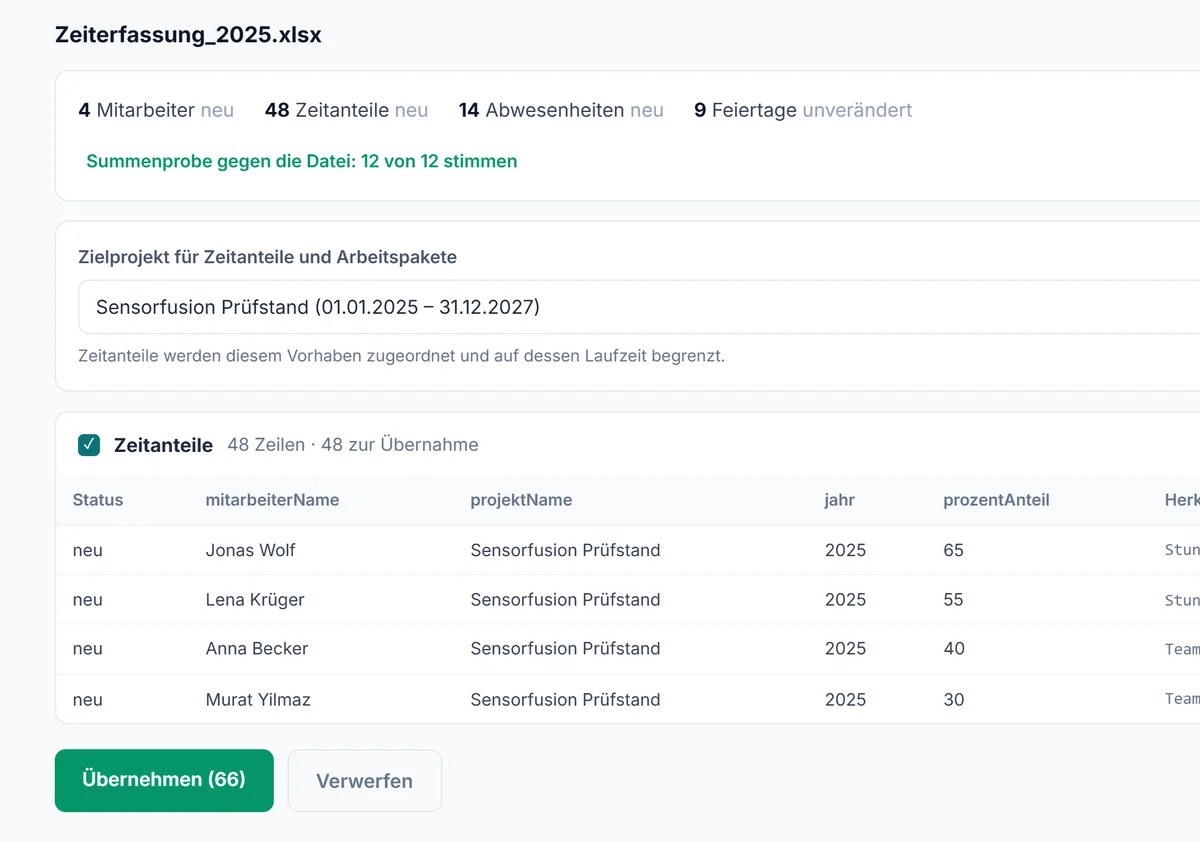
Every change documented
The software records every change with time, user, and old and new value. The result is an exact audit trail from the import to the time record.
NOVARIS
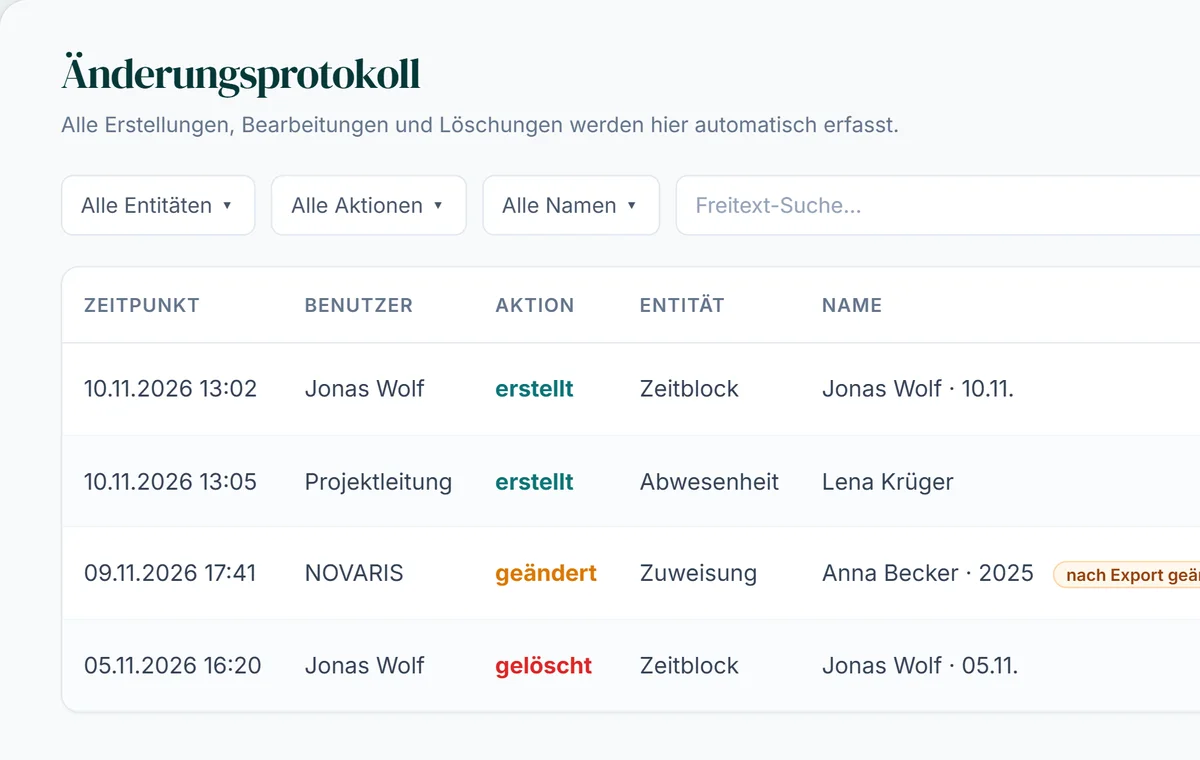
Set the cut-off date
Up to the cut-off date the reconstruction stays unchanged. From the cut-off date only self-recorded hours count.
NOVARIS
Record in-house
Your employees receive personal logins and enter their R&D hours in time blocks, on a computer or on the phone.
Your employees
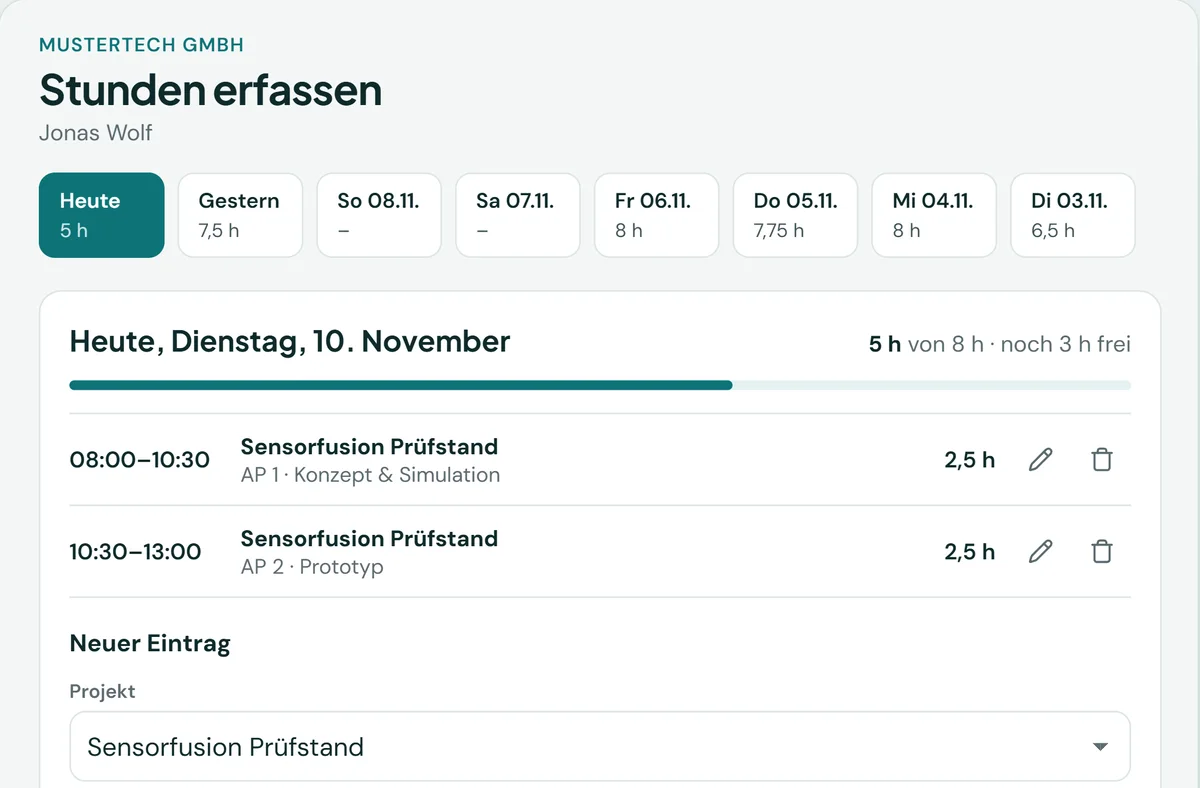
Views of the software with sample data. The cut-off date is shown schematically.
What does the software record, and what does it secure?
The software logs every change, checks every entry and makes every export verifiable. The details are in the dossier below.
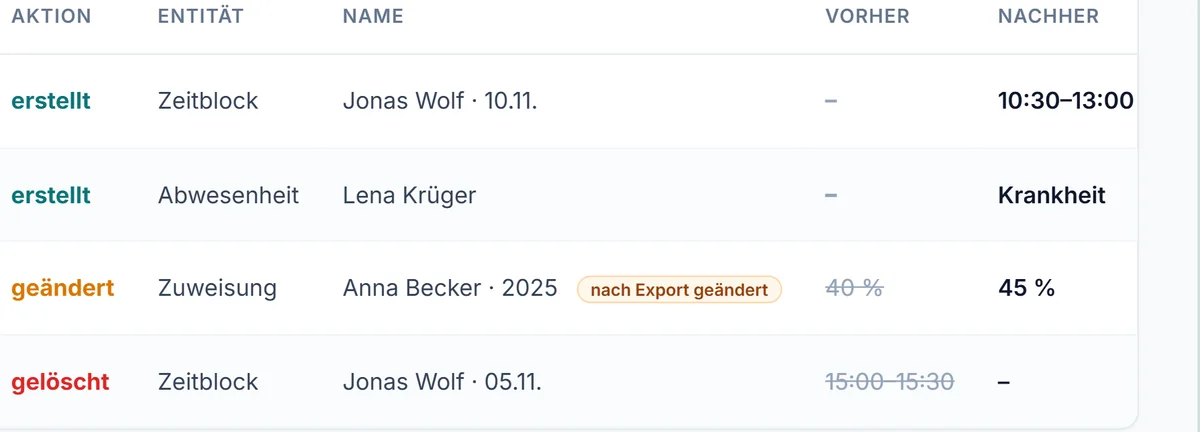
A change log that can only be appended
Every change is in the log with time, user and the state before and after. The entries are chained by checksums, and the “Verify log” function checks the chain.
Rules checked on every entry
The software checks every entry against fixed rules. Open items appear in the checklist, which leads straight to the place concerned.
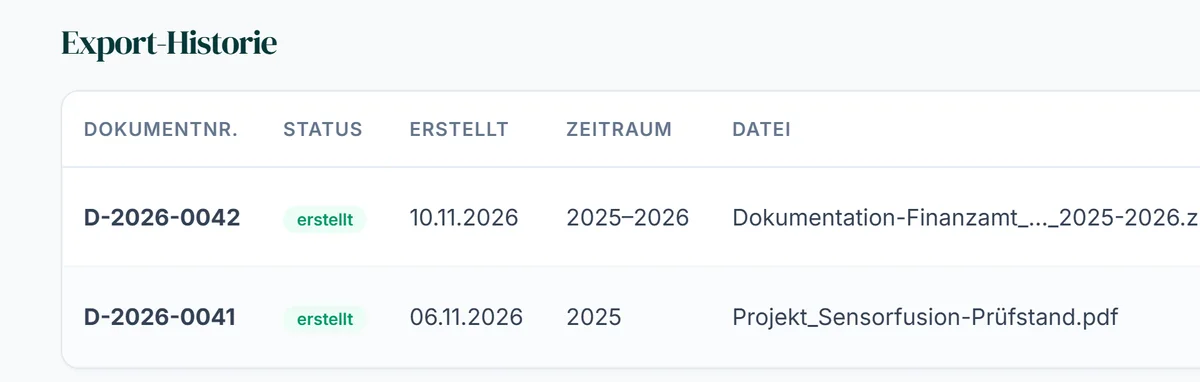
Exports that can be verified
Every export gets a consecutive number, and the original is stored with a checksum. A submitted file can be compared against that original.
Everyone sees only what they should
Employees see their own hours, management books for everyone. A viewer reads along, with monetary amounts redacted.
Backups in the background
The data is backed up in full every night and transferred hourly, encrypted, to external storage.
Key facts in brief
The time records are the evidence on which the personnel costs in the application for the R&D tax credit rest. NOVARIS keeps them in its own R&D software in two phases. First, past years are reconstructed retroactively: you hand over your documents or import them directly, and a local AI processes them in line with the GDPR and allocates the hours to project and work package. Then a cut-off date defines the switch. Up to that date the reconstruction stays unchanged; from then on the hours your employees record themselves in the software count. Every change is written to a log that can only be appended, and every export can later be checked against the stored original. The software is included in the fee, there are no extra costs.
Key facts on the time records
How are past years reconstructed retroactively?
You hand over your time records, salary data and absences, or import them directly. A local AI processes the data in line with the GDPR and allocates the hours to project and work package on the basis of your time records. Every change is documented, which gives an exact audit trail.
| Data | What it is needed for |
|---|---|
| Salaries per employee | basis of the eligible personnel costs |
| Time shares | share of working time spent on research and development |
| Absences | holiday, sickness and public holidays per federal state block the days |
| Distribution to work packages | allocation of hours to project and work package |
| External contracts | contract research alongside your own personnel costs |
Which details a time record for the tax office must contain is explained on the page time tracking for the R&D tax credit. Which years can still be claimed is shown in the overview of open fiscal years.
Time records are one of six types of R&D software. The other types range from project management to the electronic lab notebook. An overview with examples of vendors in Germany is on R&D software compared.
How do employees record their R&D hours from the cut-off date?
Each employee enters hours in time blocks from–to and assigns them to a project and a work package. The form is built for the phone. The software checks the entries against fixed rules, and violations appear in the checklist. Days with holiday, sickness or a public holiday are blocked.
| Rule | What it flags |
|---|---|
| At most 8 hours per day | R&D hours beyond the daily working time |
| Sum of shares at most 100% | more time distributed than was worked |
| No hours at the weekend | entries on non-working days |
| Holiday, sickness, public holiday per federal state | hours on days without attendance |
- Hours can be recorded per day or as a percentage share.
- Employees can record or correct up to 7 days back. This can be switched off per company.
- Periods that have already been exported are locked for employees.
- A checklist shows open items and leads directly to the place where they are fixed.
- The grid is 15 minutes. The software does not allow overlaps or entries in the future.
- The public holidays of all 16 German states are stored, plus a company calendar of your own.
- Employees enter holiday and sick leave themselves, also as half days.
What makes the documentation GoBD-compliant?
The software records who changed what and when, and makes every export verifiable. The change log can only be appended; the database prevents changing and deleting. The entries are chained by checksums, and a procedure documentation describes the process.
| Element | How it is implemented |
|---|---|
| Change log | every entry with time, user and the state before and after, append-only |
| Chaining | the log entries are chained by checksums, the function "check log" verifies the chain |
| Exports | consecutive number per export, the original is stored with a checksum |
| Check document | a submitted file can be compared against the stored original |
| Procedure documentation | available in the software as a page and as PDF |
| Deleting | only via the recycle bin and locked within the retention period |
| Backup | complete every night, encrypted to external storage every hour |
| Storage location | servers in Falkenstein, Germany |
If someone changes data after an export, the software marks the period as "changed after export". The data is not locked after an export. The earlier export is kept in its original form.
Who sees and edits what?
Each person receives a personal login with a role. Employees see only their own hours, management can book for all employees of the company, and a viewer reads along without seeing monetary amounts. NOVARIS sets up the logins.
| Role | Rights |
|---|---|
| Company admin | manages their own company |
| Management | books for all employees of the company |
| Employee | records and sees only their own hours |
| Employee with read access | record own hours, read colleagues' hours |
| Viewer | read only, monetary amounts are redacted |
Which evidence comes out of the software?
The most important export is the time record for the tax office as a PDF based on the official form. Added to that are reports per project, employee and company, the change log and an overview with the values that go into the ELSTER application. Signing is done on the printed export.
| Export | Format |
|---|---|
| Time record for the tax office | PDF based on the official form, hours additionally as CSV |
| Reports per project, employee and company | |
| Funding overview | |
| ELSTER overview with the entry values | CSV |
| Change log | PDF and CSV |
How personnel costs from the hours enter the assessment basis is explained on the page personnel costs for the R&D tax credit. The application at the tax office is described in the R&D tax credit in the tax return. Your tax firm receives the time record and the ELSTER overview as PDF and CSV. How the tasks are split is shown in the division of work with your tax firm.
How does the software implement the BMF requirements?
The BMF circular of 27 October 2026 sets out what a time record has to look like. The software records electronically per working day and project, carries the minimum details in the record and logs every change.
| BMF requirement | Implementation in the software | Para. |
|---|---|---|
| A record for every working day in the project, in hours per project | time blocks from–to in a 15-minute grid per project and work package | 110, 122, 123 |
| Minimum details: project, fiscal year, project ID, name and activity of the employee | shown in the header of the hour record | 124 |
| Countersignature at the end of each month for records kept by hand | not needed with electronic recording. The export also has a signature field | 125 |
| Form: electronic or on paper | electronic recording, record as a PDF following the BMF sample timesheet | 126, 127 |
| Proper record keeping under the GoBD | change log that can only be appended, and exports with a checksum | 127 |
| Allocation and working time traceable in a later audit | every hour belongs to a project, a work package and an employee, every change is in the log | 128 |
All requirements at a glance: BMF circular on the R&D tax credit 2026.
Which questions about the time records come up most often?
Set up your time records
In the initial call we clarify which years can be reconstructed retroactively, which data is needed for that and from when your employees record themselves.
Book an initial callRead on
- Time tracking for the R&D tax creditMandatory fields, methods compared and common mistakes.
- Personnel costs & R&D tax creditSalaries and employer contributions in the assessment basis.
- Claiming retroactivelyWhich fiscal years are still open.
- Own contributionsEUR 100 per hour for sole proprietors and co-entrepreneurs.
- R&D tax credit consultingSuccess-based support from project analysis to payout.

Max Nodes
Founder and Managing Director of NOVARIS Consulting. Specialised in the German R&D tax credit (FZulG) since 2021; 28 of 28 decided BSFZ applications approved (as of 11/2026). Max Nodes